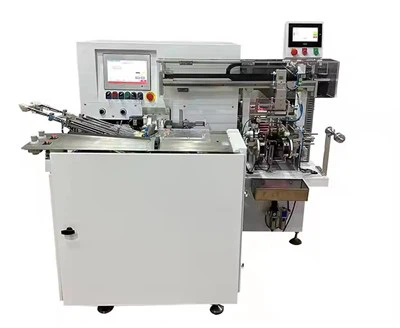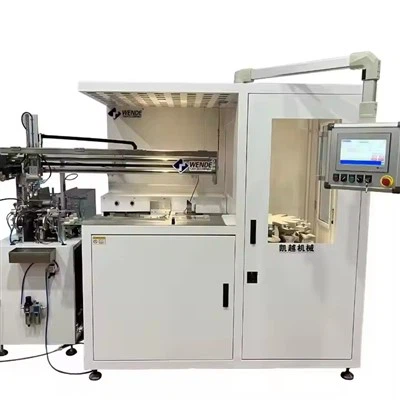

As a supplier of Automatic Toothbrush Hot Foil, I understand how frustrating it can be when your equipment stops working. In this blog post, I'll guide you through a systematic approach to troubleshooting your Automatic Toothbrush Hot Foil, ensuring that you can get it up and running as quickly as possible.
1. Initial Checks
Before diving into complex troubleshooting, start with the basics. These simple steps can often identify and resolve common issues.
Power Supply
- Check the Outlet: Ensure that the power outlet is functioning correctly. You can plug another device into the same outlet to verify. If the other device works, the outlet is fine; if not, check the circuit breaker or fuse box.
- Inspect the Power Cord: Examine the power cord for any visible damage, such as cuts, frays, or exposed wires. If you find any issues, replace the power cord immediately to avoid electrical hazards.
- Power Switch: Make sure the power switch on the Automatic Toothbrush Hot Foil is in the "On" position. Sometimes, the switch can be accidentally turned off during normal use or cleaning.
Connections
- Cable Connections: Check all the cables connecting the Automatic Toothbrush Hot Foil to other components, such as sensors or control panels. Ensure that they are securely plugged in and there are no loose connections. Loose cables can cause intermittent or complete loss of functionality.
- Sensor Connections: If your Automatic Toothbrush Hot Foil has sensors, inspect their connections as well. Loose or damaged sensor connections can lead to incorrect readings or system malfunctions.
2. Error Codes and Indicators
Many modern Automatic Toothbrush Hot Foil systems are equipped with error codes and indicator lights. These can provide valuable clues about the source of the problem.
Read the Error Codes
- Refer to the Manual: Consult the user manual that came with your Automatic Toothbrush Hot Foil. It should have a section dedicated to error codes and their meanings. Look up the error code displayed on the control panel and follow the recommended troubleshooting steps.
- Online Resources: If you don't have the manual or can't find the error code in it, visit the manufacturer's website. Many manufacturers provide online resources, including error code databases and troubleshooting guides.
Check Indicator Lights
- Power Indicator: A blinking or non - lit power indicator may indicate a power supply issue. Refer to the power supply checks mentioned earlier.
- Fault Indicator: Some Automatic Toothbrush Hot Foil systems have a fault indicator light. A lit fault indicator can point to a specific component or system that is malfunctioning.
3. Component Inspection
If the initial checks and error code analysis don't solve the problem, it's time to inspect the individual components of the Automatic Toothbrush Hot Foil.
Heating Element
- Visual Inspection: Look for any signs of damage to the heating element, such as burns, cracks, or discoloration. A damaged heating element may not be able to generate the required heat, causing the system to stop working.
- Resistance Test: Use a multimeter to measure the resistance of the heating element. Compare the measured resistance with the specifications provided in the user manual. If the resistance is significantly different, the heating element may need to be replaced.
Foil Feeding Mechanism
- Jams: Check for any jams in the foil feeding mechanism. Foreign objects, such as debris or misaligned foil, can cause the mechanism to stop working. Remove any obstructions carefully.
- Motor Function: Listen for the sound of the motor that drives the foil feeding mechanism. If the motor is not running or is making unusual noises, it may be faulty. You may need to replace the motor or have it repaired by a professional.
Control Panel
- Buttons and Displays: Check the buttons on the control panel for any signs of damage or sticking. A malfunctioning button can prevent you from operating the Automatic Toothbrush Hot Foil correctly. Also, inspect the display for any errors or abnormal readings.
- Internal Components: If you have the technical expertise, you can open the control panel (while following proper safety procedures) and check for loose connections, burnt components, or signs of moisture damage.
4. Software and Firmware
In some cases, software or firmware issues can cause the Automatic Toothbrush Hot Foil to stop working.
Software Updates
- Check for Updates: Visit the manufacturer's website to see if there are any software or firmware updates available for your Automatic Toothbrush Hot Foil. Installing the latest updates can often fix bugs and improve system performance.
- Update Procedure: Follow the manufacturer's instructions carefully when updating the software or firmware. Make sure to back up any important data or settings before proceeding.
Reset the System
- Factory Reset: If you suspect a software glitch, you can try performing a factory reset on the Automatic Toothbrush Hot Foil. This will restore the system to its default settings. However, be aware that a factory reset will erase any custom settings you have made.
5. Seek Professional Help
If you have gone through all the troubleshooting steps and still can't get your Automatic Toothbrush Hot Foil to work, it's time to seek professional help.
Manufacturer Support
- Contact the Manufacturer: Reach out to the manufacturer's customer support team. They have the expertise and resources to assist you further. Provide them with detailed information about the problem, including the error codes, any troubleshooting steps you have taken, and the model and serial number of your Automatic Toothbrush Hot Foil.
- Warranty Service: If your Automatic Toothbrush Hot Foil is still under warranty, the manufacturer may offer free repair or replacement services.
Professional Technicians
- Local Service Providers: Look for local technicians or service providers who specialize in Automatic Toothbrush Hot Foil systems. They can diagnose and repair the problem on - site. Make sure to choose a reputable service provider with experience in working with your specific model.
Related Products and Resources
If you are interested in other aspects of toothbrush manufacturing, we also offer a range of related products. You can explore Toothbrush Bristles Machinery, which is essential for the production of high - quality toothbrush bristles. Our Toothbrush Tufting Trimming Grinding Machine is designed to streamline the toothbrush manufacturing process. And for those looking for a unique solution, our Toothbrush Banane Ki Machine offers innovative features.


Contact Us for Purchase and Consultation
If you are facing persistent issues with your Automatic Toothbrush Hot Foil or are interested in purchasing new equipment, we are here to help. Our team of experts can provide you with detailed information, offer customized solutions, and assist you in making the right choice for your business. Don't hesitate to contact us for further discussion and procurement.
References
- Manufacturer's User Manual for Automatic Toothbrush Hot Foil
- Industry Standards and Guidelines for Toothbrush Manufacturing Equipment
- Technical Bulletins and Whitepapers on Automatic Toothbrush Hot Foil Systems